Cloud-First Fax Platform
Use email, web portal and supported integrations instead of relying only on traditional fax hardware.
Send and receive faxes by email, web portal or API. Manage numbers, users, delivery activity and account workflows from one modern platform—backed by real telecom support.
Replace disconnected fax tools with one platform for sending, receiving, monitoring, migrating and supporting business fax workflows.
Use email, web portal and supported integrations instead of relying only on traditional fax hardware.
Review queued, processing, delivered and failed activity with timestamps and operational context.
Review current numbers, users and workflows, then move eligible fax numbers with a planned cutover.
Get help from a team that understands fax delivery, number routing, ATAs, email workflows and troubleshooting.
Explore a dedicated overview of centralized fax-number management, email and portal workflows, number migration, activity visibility and compatible traditional fax-machine support.
Centralize fax numbers, users, routing and activity across separate locations.
Inventory existing numbers and workflows, test service and coordinate production cutovers.
Switch between email, portal, API and inbound fax workflows to see how documents move through eFaxify.
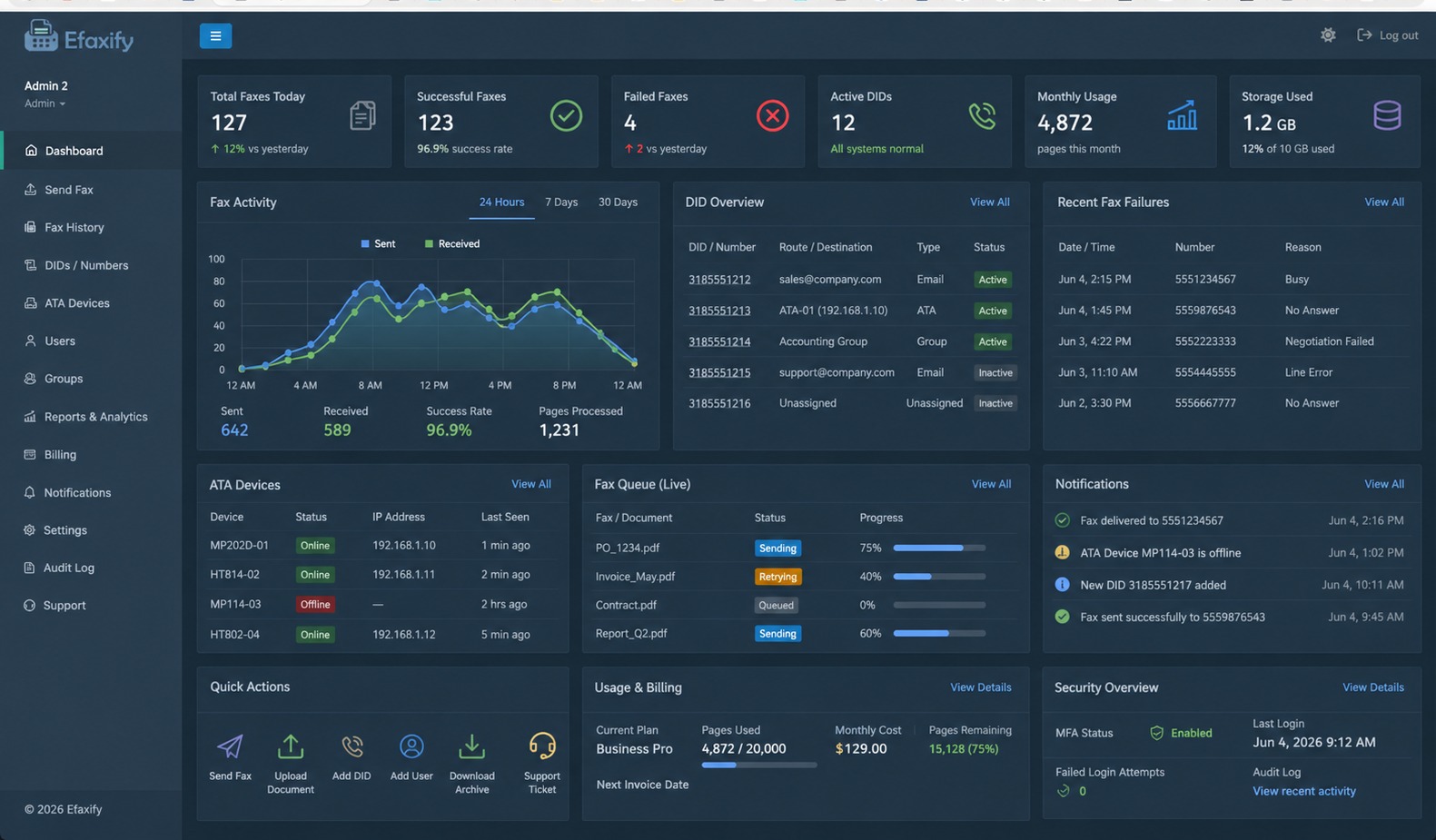
Manage fax activity, numbers, users, ATA devices, queue status, account settings, notifications and security from the eFaxify customer portal.
Create an email from an authorized address, attach the document and send it to the destination fax number followed by:
eFaxify supports traditional fax machines and multifunction printers through Triton’s managed AudioCodes MP-202D fax ATA.
Connect existing fax equipment to the Triton ATA and continue sending and receiving through the eFaxify cloud platform over a properly configured broadband Internet connection—without maintaining a traditional analog fax line.
Continue using many existing fax machines and multifunction printers instead of replacing familiar hardware.
Use the customer’s Internet connection instead of maintaining a traditional analog telephone line.
The AudioCodes MP-202D is provisioned and supported by Triton, including secure HTTPS-based management workflows.
Combine physical fax equipment with email-to-fax, fax-to-email and portal users while modernizing at your own pace.
eFaxify provides fax activity and delivery-state visibility so users can review what is queued, processing, delivered or failed and decide what to do next.
Triton helps review current fax numbers, users, destinations and business processes before a planned migration.
Numbers, users, email destinations, ATAs and monthly volume.
Porting, user setup, routing and migration schedule.
Numbers, users, notifications, portal and ATA options.
Inbound, outbound, email, portal and destination workflows.
Coordinate eligible number ports and production activation.
Monitor activity and help resolve post-migration issues.
Patient referrals, records requests, pharmacy communication and administrative document exchange.
Court documents, case materials, signed forms and client records.
Applications, authorizations, supporting documents and compliance-oriented workflows.
Forms, approvals, records and department-to-department delivery.
Centralized visibility across offices, users and departments.
eFaxify can support HIPAA-oriented workflows when appropriately configured and used under the customer's compliance program.
Automate supported fax workflows for applications that need document delivery, activity tracking and scalable account operations.
{
  "to": "3185551212",
  "document": "records-request.pdf",
  "callback": "https://example.com/fax-status"
}Illustrative example only. Confirm exact API methods and fields against current eFaxify documentation.

Triton AI can explain email-to-fax, portal workflows, number migration and common eFaxify tasks while human support remains available.
Quick answers about cloud fax, migration, portal use and delivery workflows.
View All FAQs →Triton can review the number for porting eligibility and help plan the migration.
Send from an authorized email address to the ten-digit fax number followed by @fax.solutions and attach the document.
Inbound faxes can be routed to approved email destinations and reviewed through the configured account workflow.
Yes. The eFaxify portal includes a send-fax workflow for approved users.
Shared workflows may be available depending on the account design, destinations and user requirements.
Yes. The portal provides fax activity and delivery-state visibility.
API-based workflows may be available. Triton can review the integration requirements and current documentation.
ATA support options may be available where the equipment, network and selected service design are suitable.
Triton reviews numbers and workflows, plans the migration, configures service, tests delivery and coordinates the production cutover.
Failed activity is shown with available status information so users can review and decide whether to retry or investigate.
eFaxify can support healthcare-oriented fax workflows when appropriately configured and used within the customer's compliance program.
Tell us how many fax numbers, users, locations and monthly pages you manage. Triton will help plan the numbers, workflows, migration and support requirements.
